When you ask the agent to change something on your site — or just ask it for advice — a lot happens behind the scenes to make sure it acts correctly. This page explains that flow in plain terms: what the agent knows, when it learns it, and how SchemaWP keeps it on the rails.
The problem routing solves
An AI agent connecting to your site is capable but, on its own, knows nothing about your design system or how Automatic.css works. Handing it everything at once would be slow, expensive, and confusing — like giving someone the entire manual before every small task.
So instead of dumping all the information up front, SchemaWP feeds the agent the right knowledge at the right moment. We call this routing: matching each request to the exact context the agent needs, and nothing more.
The layers of context
Think of it as three layers, delivered in order:
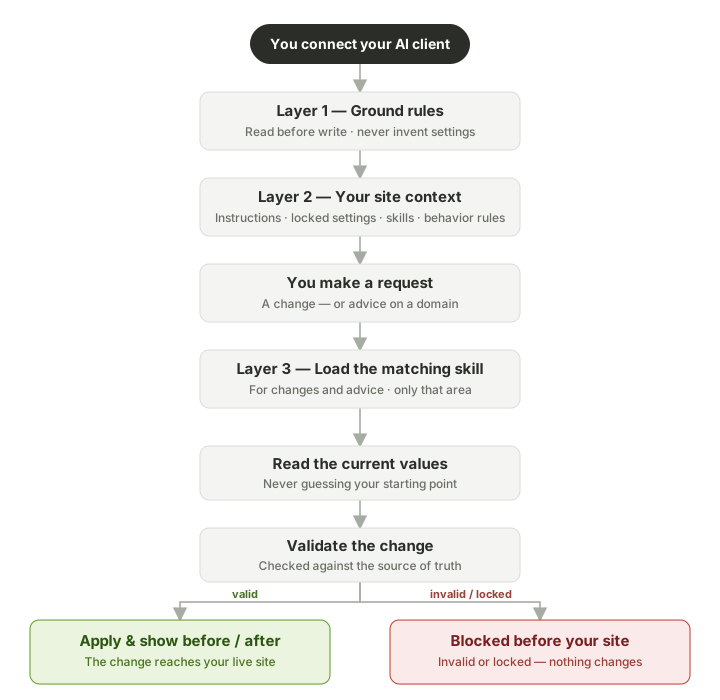
1. The ground rules (delivered the moment you connect)
As soon as your AI client connects, SchemaWP gives the agent its core rules: how to behave, what’s safe to change, and what it must never touch. These are universal — they apply on every site and in every session. For example: read before you change, never invent a setting that doesn’t exist, and describe things in plain language rather than technical jargon.
2. Your site’s context
Next, the agent reads the context specific to your site:
- Your instructions — plain-language rules you’ve written (“never change the primary color,” “keep spacing compact”).
- Locked settings — anything you’ve marked as off-limits.
- Behavior rules — how the agent should communicate and what safety checks it runs.
- Available skills — which areas of knowledge are switched on for this site.
This is always the agent’s first step before doing any work. It’s how your preferences and guardrails reach the agent.
3. On-demand skills
This is the heart of routing. Each area of your design system — colors, typography, spacing, buttons, cards, and so on — has a matching skill: a focused set of instructions for working in that area correctly.
The agent loads a skill whenever it’s about to work in — or give you advice about — that area. Asking about colors? It loads the color knowledge. Adjusting spacing? It loads the spacing knowledge. It doesn’t carry the whole library around — it picks up the right chapter for the task in front of it, then moves on.
How the agent stays accurate
Underneath the friendly skills sits a single, authoritative list of every Automatic.css setting and what a valid value looks like. This is the agent’s source of truth, and it’s what makes routing reliable:
- Every setting maps to a skill. When the agent looks at a setting, the system tells it which skill covers it — so the agent always knows where to find the right guidance.
- It reads before it writes. The agent checks the current values before proposing a change, so it’s never guessing about your starting point.
- Changes are validated before they’re applied. Every proposed change is checked against that authoritative list. If a value is invalid or targets something that shouldn’t be changed, it’s blocked before it reaches your live site — and you’re shown a clear before-and-after of anything that does change.
Why this matters to you
- Accuracy — the agent works from real, validated knowledge of your system instead of guessing.
- Speed and lower cost — loading only what’s needed for each task keeps sessions fast and efficient.
- Safety — your instructions, locked settings, and validation all sit between the agent and your live site.
- Consistency — because changes go through the source of truth, your design system stays coherent no matter how many adjustments you make.