In the latest version of Schema we started expanding into layout generation for EtchWP, using your existing pattern library as the raw material and the agent as the planner.
Patterns as structural archetypes
A good amount of layout building work repeats across projects. Not because the designs look the same, but because many sections serve the same structural role. Think of how many times you have built a section with icon cards, a features row, or a testimonial block. The ACSS configuration makes each instance look different on every site, but the underlying structure shares common properties.
What if you could build a library of your best sections, curate it over time, and reuse it across projects? And more importantly, what if an agent could generate page layouts from that library, directly from the chat session?
Patterns in EtchWP
In Etch, you can save any section as a Pattern. Etch stores it as a native Block Pattern. From there you can organize patterns into categories: Heroes, Feature sections, FAQs, and so on. You are building assets: refined, organized, predictable, and reusable.
ACSS as the design backbone
This is where Automatic.CSS changes the equation. Every pattern in your library is built on ACSS tokens, not hardcoded values. A hero section doesn’t have a color. It has var(--color-primary). A heading doesn’t have a font size. It has var(--text-xl).
This means every pattern automatically adapts to the ACSS configuration of any site it lands on. Same structure, different design expression. The agent composes the layout. ACSS resolves the visual output. No manual style adjustments needed.
Adding context to patterns
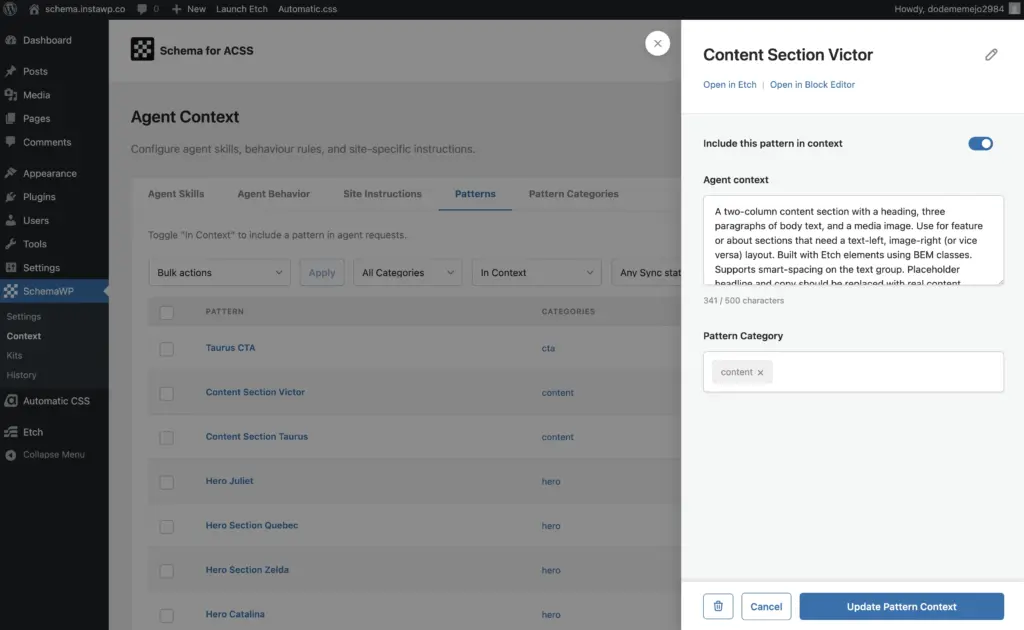
With Schema, you assign meaning to your patterns by adding context descriptions to each one, and to each category. These are plain-text placement rules the agent reads when planning a layout.
For example: “Use at page top only. Best for SaaS products. Never stack two heroes.” Or: “Place after hero. Use when you have concrete numbers to show.”
The agent uses these rules to select and sequence patterns that fit the page goal.
Generating layouts from the chat session
In any AI chat session, describe the page you need. The agent reads your pattern library, applies the context rules, and composes a layout. Pattern-based layouts can be applied to new or existing pages. You can prepend, append, or fully replace a layout at any time.
Why this works
Instead of generating a layout from scratch, the agent works from your existing curated material. This keeps the output predictable, consistent with your design system, and fast. Fewer tokens. No generic filler. No markup that escapes your ACSS setup.
The agent compose the layout, you fine-tune.
Sharing patterns across sites
Just as Schema lets you save and share ACSS Kits across projects, the same mechanism will soon be extended to pattern libraries. Build a pattern once, share it across multiple sites. Each site applies its own ACSS configuration on top, same structure, different visual output depending on the design system underneath.
Current limitations
Pattern content is not editable by the agent. Layouts are composed with original text and assets intact. You replace content manually after generation. Mid-page insertion is also not yet supported. Patterns can only be added at the start, end, or as a full layout replacement.
Where this is going
We are working toward giving agents the ability to compose layouts in EtchWP from scratch, with custom skills and tools that make full generative layout building possible while keeping ACSS as the design layer throughout.